Revision poster: VPC CNI, IP planning and load balancing.
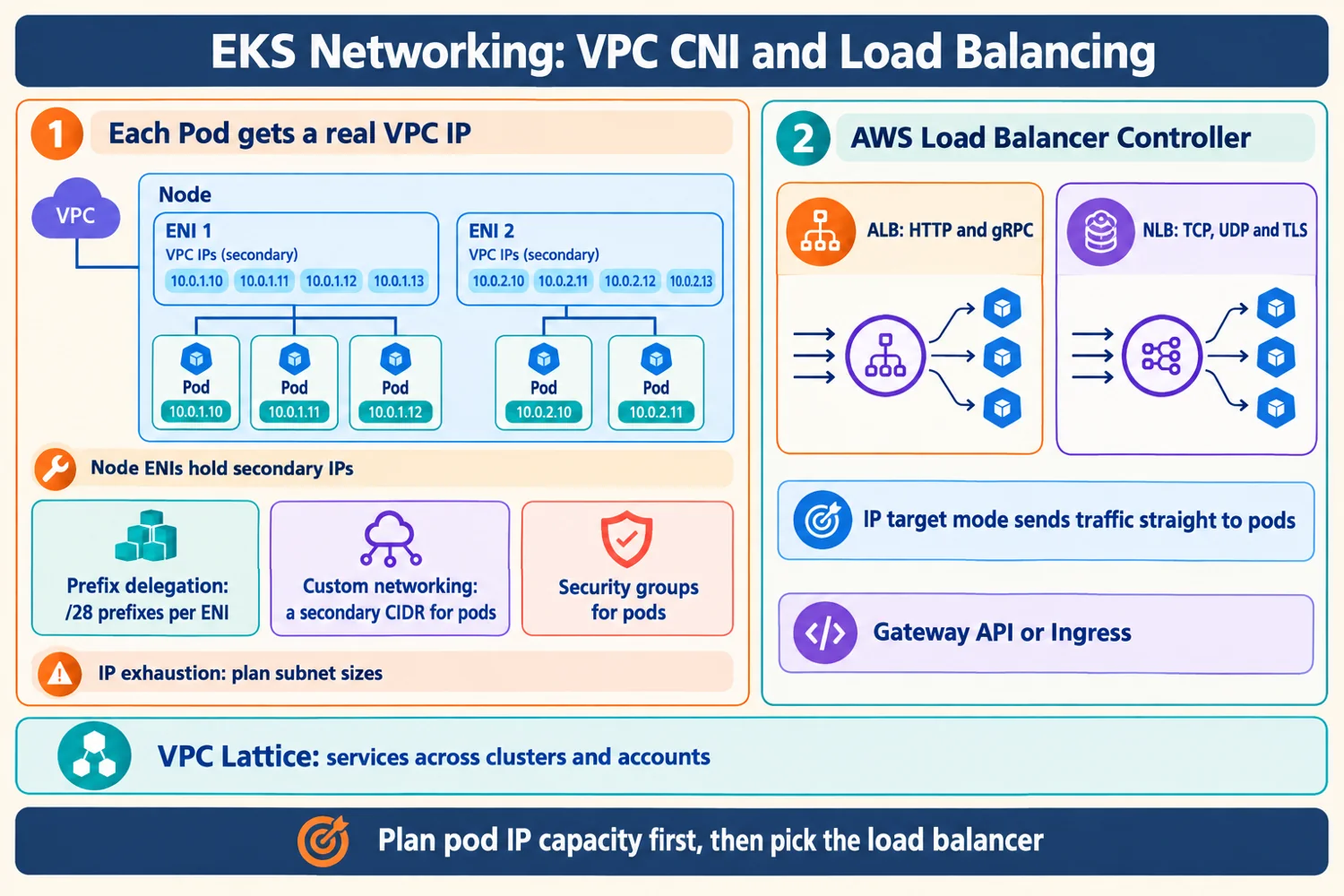
Left: how Pods consume VPC IPs and the three tools for IP pressure. Right: how traffic enters the cluster. Bottom: cross-cluster services.
- 1Pods use real VPC IPs from node ENIs; capacity per node is limited by the instance type.
- 2Prefix delegation raises Pods per node; custom networking adds a secondary CIDR; IPv6 removes the limit.
- 3Security groups for pods control Pod to AWS resource access.
- 4The Load Balancer Controller builds ALBs for HTTP and gRPC and NLBs for TCP, UDP and TLS.
- 5IP target mode sends traffic straight to Pods.
- 6VPC Lattice connects services across clusters and accounts.
Self-check: cover the poster and answer
- Which fix helps when the whole VPC CIDR is nearly full?
- Why is IP target mode preferred over instance mode?
Plan pod IP capacity first, then pick the load balancer.